
Changelog
Latest Holy Resource features, improvements, and fixes.
Thank you for choosing Holy Resource! We're committed to helping your church thrive. Stay connected for more updates that make ministry easier and more impactful.
July 18, 2026
Visitor Pipeline Stage Management
Visitor follow-up teams now have more control over how their pipeline work is organized.
What You Can Do Now:
- Add a stage through a dialog with a required name plus optional responsible person, due date, and email notification setting
- Let the assigned stage owner(s) move visitor cards forward while other users continue to use their communication permissions
- Notify the assigned person when a new visitor enters their stage
- Switch between the default stage board and a color-coded progress overview with open and done counts, assignees, and due dates
- Keep stage ownership and notification settings synchronized across joined branch devices
Why This Matters:
- Every stage has clearer ownership
- Teams can see pipeline health without opening every card
- New visitor follow-up is less likely to wait unnoticed
Attendance Count Check-In
Attendance teams can now record aggregate counts by gender when individual check-in records are not practical.
What Improved:
- Enter male and female counts directly from the quick check-in flow
- Use server-side aggregation instead of creating synthetic individual records
- Validate the event and date before accepting the count
Safer Guardian QR Passes
Kids Wing guardian passes now have stronger lifecycle controls.
What You Can Do Now:
- Generate and regenerate tokenized guardian QR passes
- Revoke or restore a guardian pass with audit information
- Validate the pass token during QR check-in so an old or revoked pass cannot be used
Event Workflow and Date Reliability
Event planning received practical improvements for files and date handling.
What Improved:
- Attach run sheets, artwork, handouts, and other supporting files directly to events
- Parse date-only values as local dates to prevent timezone shifts in forms, calendars, and event lists
- Improve regional time formatting and calendar refresh handling
Platform Reliability
- Improved migration connection handling for safer startup upgrades
- Added safer registration for new attendance and guardian-pass command surfaces
- Addressed additional Kids Wing, onboarding, attendance, and release workflow edge cases
May 8, 2026
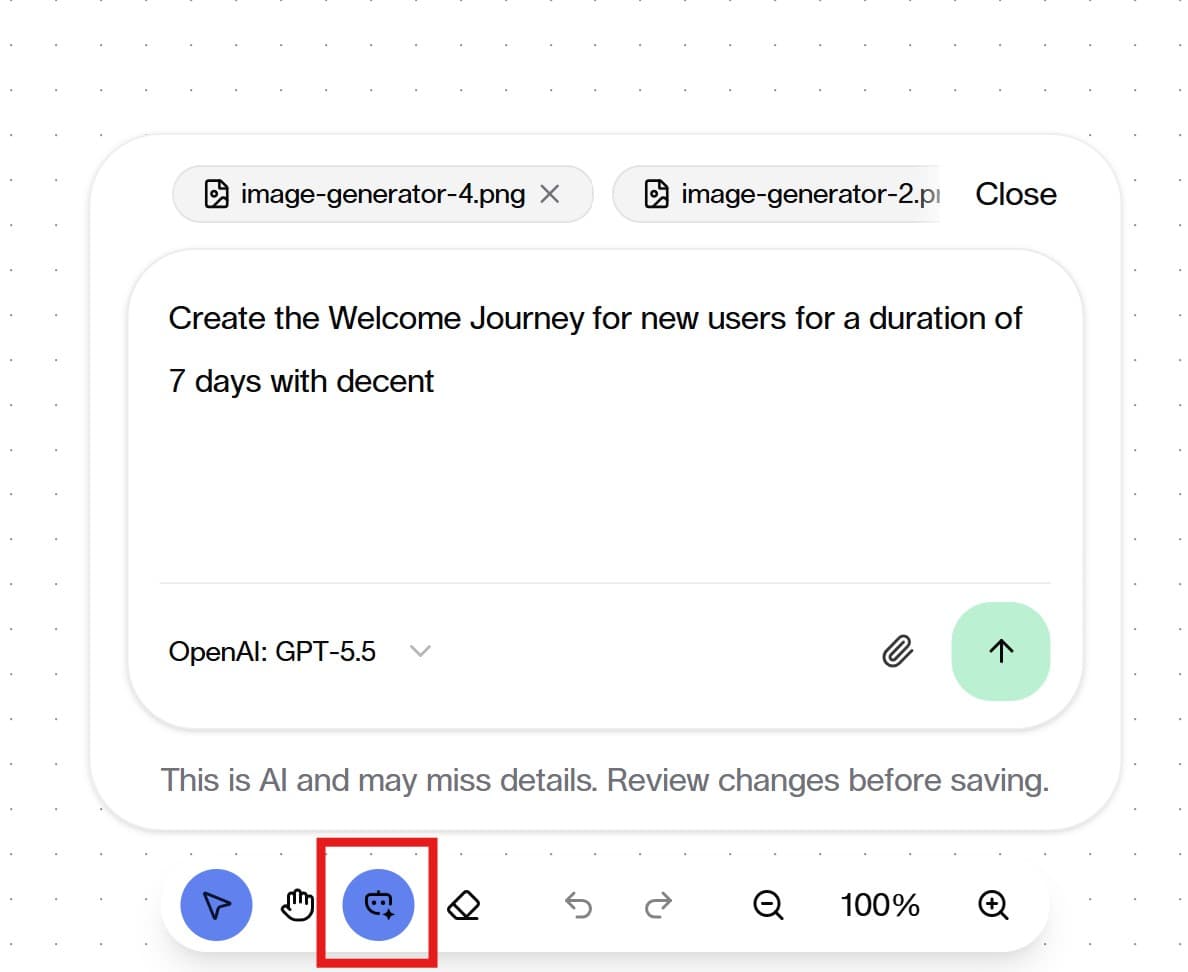
AI-Powered Communication Workflow Builder
Holy Resource now includes a stronger AI experience in Communication workflows.
What You Can Do Now:
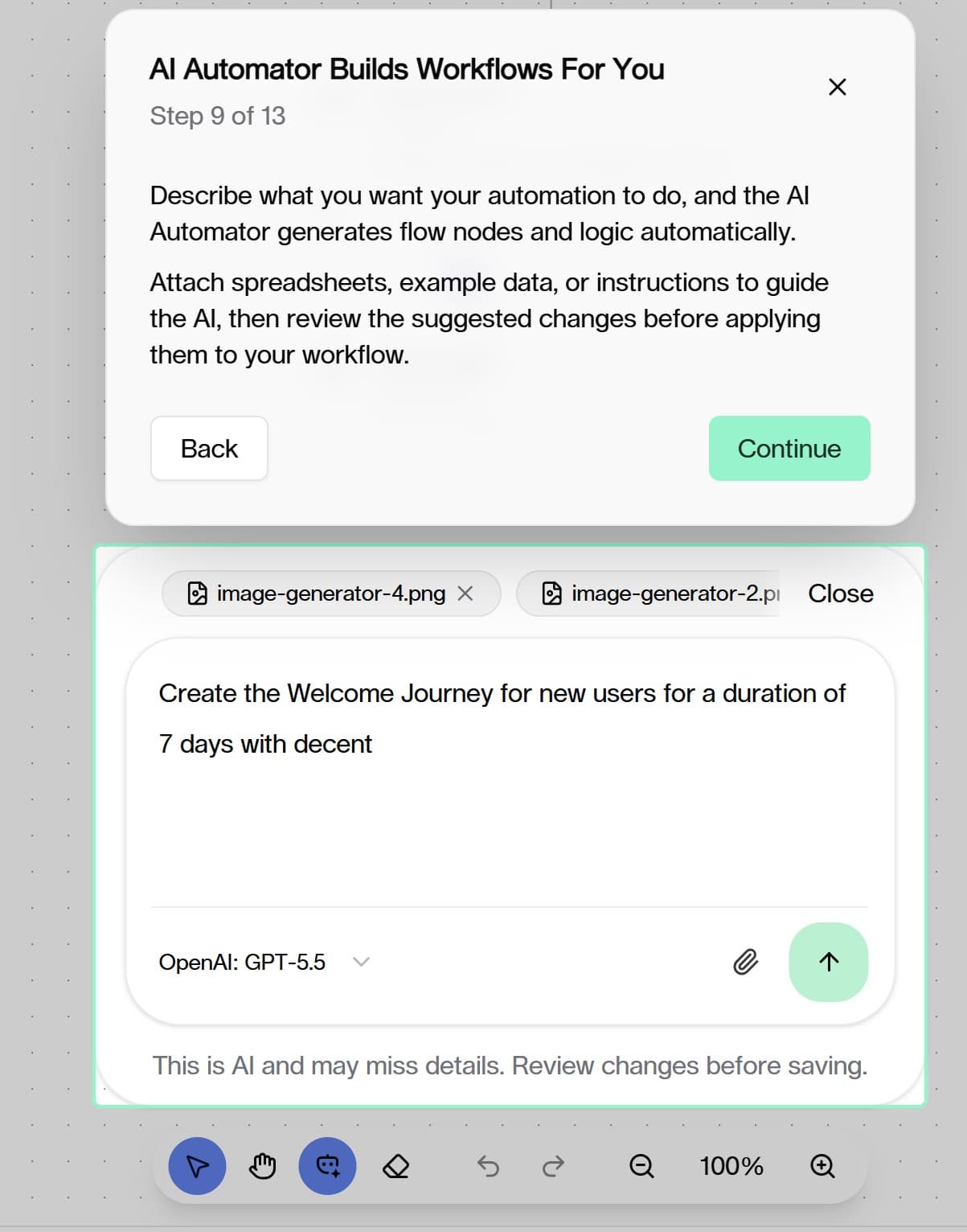
- Use AI Automator in the Builder: Describe your automation in plain language and let Holy Resource build the flow for you.
- Write With AI directly inside text editors: A new in-editor AI Writer can rewrite highlighted text or generate new text without leaving the editor.
- Work with more step types in automations: Teams can now use clearer action and routing steps like wait, split path, webhook actions, tagging, and contact updates.
- Preview with more confidence: Test and preview outputs are now easier to read before you publish.
Why This Matters:
- Faster setup for ministry communication journeys
- Less copy-paste between screens
- Easier review before sending real messages
Attachments Across Core Workflows
Attachments are now much more practical in everyday church operations.
Where You Can Use Attachments:
- Member records
- Events and service planning segments
- Inventory items
What Improved:
- Upload and manage files from inside the app
- View image previews and quick thumbnails
- Keep files available across joined devices for branch work
Website Share + Embed Actions
Public sharing actions are now easier for non-technical teams.
New In-App Actions:
- Attendance: Copy website check-in link and embed code
- Invite Campaigns: Copy standard and kiosk embed code options
- Online Giving: Copy giving link and embed code from settings
Why This Matters:
- Faster website handoff to media/web volunteers
- Fewer manual steps when publishing church forms and giving pages
Better Dashboards and Team Views
Several key screens are now easier to understand at a glance.
Highlights:
- Visitor Pipeline now supports drag-and-drop board movement
- Dashboard calendar now gives a clearer combined planning view for events and assignments
- Recent members and announcements cards are cleaner and less noisy
- Inventory overview now includes trend visuals and better activity presentation
Tour Guide Introduction
Version 0.9.0 introduces the in-app Tour Guide to help teams discover key workflows and reduce onboarding friction.
In this release, Tour Guide walkthroughs cover practical actions, including attendance website sharing actions, invite embed actions, and online giving publish/copy actions.
SMS Receipts for Finance
Finance receipts now support SMS delivery alongside email, giving churches a direct way to confirm transactions in the format donors prefer most.
What Changed:
- Donations and Expenses: Receipt templates now include an SMS option — churches can create a concise text-based receipt and send it directly to a donor's phone.
- Default SMS receipt: If no custom SMS template exists, a clear default message is automatically used so no setup is needed to get started.
- Template management: The receipt template builder now clearly separates Email and SMS template types across all finance scopes (general, donation, expense).
Why This Matters:
- Donors who give via mobile or text-to-give get confirmation in the channel they checked
- No manual copy-paste — confirmation flows from the transaction record with one action
Smarter Onboarding for Additional Devices
Joining Holy Resource on a second or third device is now significantly easier, especially on mobile.
What Changed:
- Mobile-first join flow: On phones and tablets, the join screen now defaults to "Use existing account" — the most common path when adding a new device to a church already using Holy Resource.
- Desktop keeps invite-first order: On desktop, the invite code option remains the first choice since most first-time joiners arrive via a link or code.
- Clearer guidance text: The descriptions at each step now explain exactly what to do based on your situation — whether you're a first-time joiner or adding a second device.
Why This Matters:
- Reduces confusion for mobile users who already have a church account
- Fewer support requests about "it asked for an invite code I don't have"
Inventory Analytics Improvements
The Inventory Report page now presents key metrics in a way that's much easier to act on.
What Changed:
- Color-coded KPIs: Return Rate and Shrink Rate now display in green, amber, or red depending on how the church is tracking — healthy ranges are immediately obvious.
- Consistent chart sizing: All charts (trend line, return outcomes pie, top items bar) now have fixed, proportionate heights that scale cleanly across screen sizes.
- Richer tooltips: Hovering over any data point now shows human-readable labels (e.g. "Checked out", "Returned") instead of raw field names.
- Export row detail: The CSV export now splits each metric into its own labeled row for cleaner spreadsheet analysis.
Why This Matters:
- Stewardship teams can spot issues (high shrink, low return rate) at a glance
- Better data exports make reporting to leadership or auditors easier
Validated Email Input for Notification Settings
The notification email field in both Donation Settings and Expense Settings now accepts individual email addresses as chips rather than a comma-separated string.
What Changed:
- Type an email address and press Enter — it becomes a validated tag that can be removed independently.
- Invalid formats are caught immediately with a clear error message.
- Pasting a list of emails automatically splits and validates each one.
- Applies to both the donation approval notification list and the expense approval notification list.
Why This Matters:
- Removes the guesswork of getting comma-separated formatting exactly right
- Misconfigured notification emails that silently fail are caught before saving
AI & Plan Management Improvements
- Better AI usage/budget behavior for branch-level management
- Improved safety checks in automation setup to reduce duplicate or conflicting active flows
- AI Writer toolbar now shows a tooltip in compact/floating mode for discoverability
- Fixed a selection-loss issue in the floating toolbar that caused the AI Writer popover to dismiss prematurely
Fixes and Stability
- Improved updater and reopen/recovery experience on desktop
- Better single-app-instance behavior to reduce duplicate app launches
- Mobile route and redirect fixes for smoother in-app navigation
- macOS runtime compatibility fix for a more reliable app launch experience
- Additional bug fixes and polish updates across onboarding, UI flow, and app responsiveness
0.8.0 → 0.9.0: 0.8.0 focused on mobile rollout and Worship Flow. 0.9.0 builds on that foundation with stronger communication AI, richer attachments, easier website publishing, SMS receipts, smarter mobile onboarding, inventory analytics improvements, the first Tour Guide release, and reliability fixes.
April 16, 2026
Holy Resource Mobile Apps
Holy Resource expanded from desktop into practical phone and tablet workflows.
What You Can Do Now:
- Run key ministry workflows on Android phones, Android tablets, iPhones, and iPads
- Handle attendance, check-ins, and inventory tasks where ministry happens
- Keep serving even in weak internet conditions with local-first behavior
Why This Matters:
- Less back-and-forth to office computers
- Faster ministry response during live events
- Better support for volunteers at entry desks and classroom stations
Worship Flow for Live Services
Worship teams can now keep service timing and visuals better aligned.
What You Can Do Now:
- Share the current service step across joined devices
- Coordinate teams on the same local network with a simple session flow
- Keep lyric visibility more stable during live service operations
Fixes and Stability
- Better onboarding and permission reliability
- Improvements to mobile release readiness
- UI cleanup and quality polish across core screens
0.7.2 → 0.8.0: 0.7.2 improved Kids Wing service-day messaging and visibility. 0.8.0 expanded day-to-day operations with mobile app support and stronger worship-team live coordination.
March 28, 2026
Kids Wing Messaging and Session Clarity
Small but meaningful improvements to how Kids Wing communicates and tracks session state.
What Improved:
- After a child is checked out, staff can now send a checkout confirmation copy to the guardian via SMS or email directly from the checkout screen
- Room Handler can now show which volunteers are officially scheduled for the current session, making it easier to confirm who is expected before service starts
- Check-in state is now easier to verify in real time so staff can quickly confirm whether a child is already checked in before starting a new flow
Why This Matters:
- Fewer questions at pickup about whether a message was sent
- Clearer visibility for room leads on who is confirmed for a session vs. just assigned by default
- Less confusion at arrival when a child is returning after a previous check-in
Fixes and Stability
- Continued Kids Wing reliability improvements across check-in, checkout, and room operations
- Additional polish and edge-case fixes for service-day workflows
0.7.1 → 0.7.2: 0.7.1 stabilized the Kids Wing foundation. 0.7.2 added checkout confirmation messaging and better session-day visibility for room teams.
March 14, 2026
Kids Wing Stability and Volunteer Coverage
The first patch after the Kids Wing launch focused on reliability and filling gaps in volunteer management.
What Improved:
- Volunteer substitution tracking is now more complete — room leads can mark a substitute, and the substitution history is tracked over a rolling window
- Schema and data reliability fixes were applied to underlying tables to prevent drift between devices after sync
- Various Kids Wing edge cases resolved after early real-world usage on service days
Why This Matters:
- More accurate records when regular volunteers are swapped out last-minute
- Better data consistency for teams syncing across multiple devices
- Fewer surprises when returning to Kids Wing screens between sessions
Fixes and Stability
- Core schema repair to address historical drift in foundational tables
- Bug fixes across Kids Wing check-in, room, and child manager flows
- General stability improvements after the larger 0.7.0 feature release
0.7.0 → 0.7.1: 0.7.0 launched the full Kids Wing experience. 0.7.1 tightened reliability, improved volunteer substitution tracking, and repaired underlying data consistency.
February 20, 2026
Kids Wing Check-In and Pickup Security
Church teams can now run child check-in and pickup with clearer safety controls.
What You Can Do Now:
- Use guardian QR passes for faster child check-in
- Use secure pickup code verification to protect release flow
- Support practical parent/guardian check-in and pickup steps for busy Sundays
Room Handler and Volunteer Coverage
Kids ministry rooms became easier to manage in real time.
What You Can Do Now:
- Configure rooms with capacity and age ranges
- Assign and schedule room volunteers with better visibility
- Monitor occupancy and staffing readiness during live sessions
Service-Day Plan Guardrails
Order-of-service finalization became safer for live ministry execution.
What Improved:
- Better checks before finalizing plans
- Cleaner live-view support during service timing
- Reduced risk of accidental last-minute plan changes
Fixes and Stability
- Better workflow reliability across events and check-in operations
- Continued polish for smoother day-to-day team usage
0.6.0 → 0.7.0: 0.6.0 focused on AI setup and planning tools. 0.7.0 turned that momentum into safer kids ministry operations and stronger service-day execution.
December 31, 2025
AI Setup and Everyday AI Tools
Holy Resource added stronger AI controls and practical AI helpers.
What You Can Do Now:
- Set up AI for your branch with clearer controls
- Use AI assistance in planning and communication workflows
- Monitor AI usage more clearly
Order of Service Planning Upgrade
Service planning became much more streamlined.
What Improved:
- Faster schedule building
- Better flow adjustments while planning
- Cleaner ways to prepare content for service-day teams
Modern Volunteer Schedule Templates
Volunteer scheduling moved to a more flexible template experience.
What You Can Do Now:
- Build reusable schedules with easier visual control
- Generate polished outputs for teams and ministry leaders
- Keep schedule creation faster and more repeatable week to week
Fixes and Stability
- Better form and dialog consistency
- Better reliability across planning and automation-related screens
- Ongoing quality improvements to reduce friction in day-to-day operations
0.5.0 → 0.6.0: 0.5.0 focused on security and data protection. 0.6.0 focused on planning power, smarter workflows, and easier team coordination.
December 20, 2025
Stronger Data Protection
Holy Resource introduced stronger protection for sensitive records.
What Improved:
- Better protection for private member and donor information
- Safer branch-level data handling
- More secure sharing behavior between joined devices
Fixes and Stability
- Security-focused reliability improvements
- Lower-friction day-to-day usage while keeping protections in place
0.4.1 → 0.5.0: 0.4.1 was a small stabilization update. 0.5.0 delivered a major step forward in data security and trust.
December 19, 2025
Fixes and Stability
- Resolved minor issues for smoother day-to-day operation
- Improved overall consistency after the larger 0.4.0 feature release
0.4.0 → 0.4.1: 0.4.0 introduced major new operations features. 0.4.1 tightened stability and reduced friction.
December 18, 2025
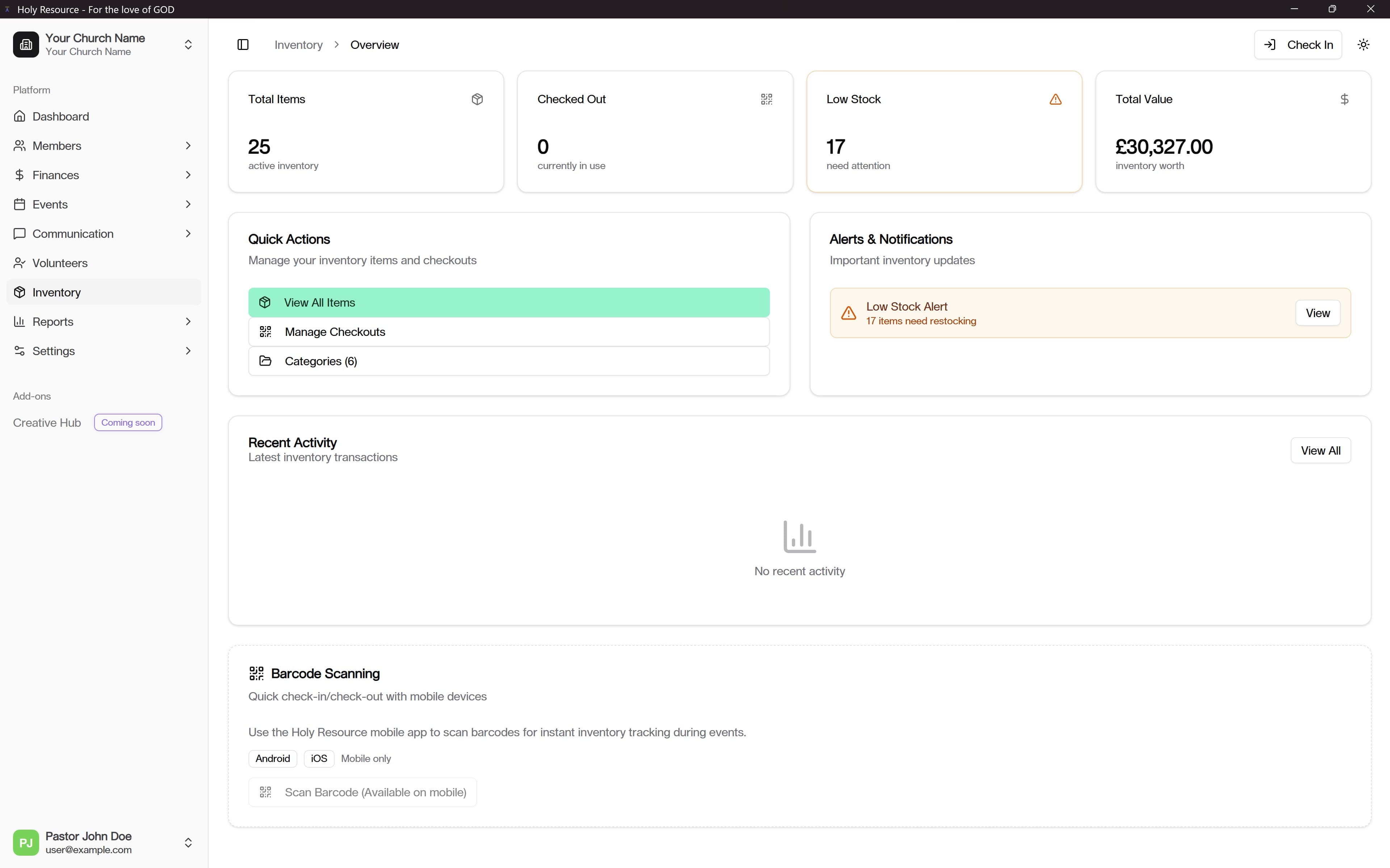
Complete Inventory Management
Holy Resource introduced a full inventory workflow for church assets.
What You Can Do Now:
- Track equipment and supplies more clearly
- Check items in and out with faster workflows
- Monitor stock and keep ministry usage more organized
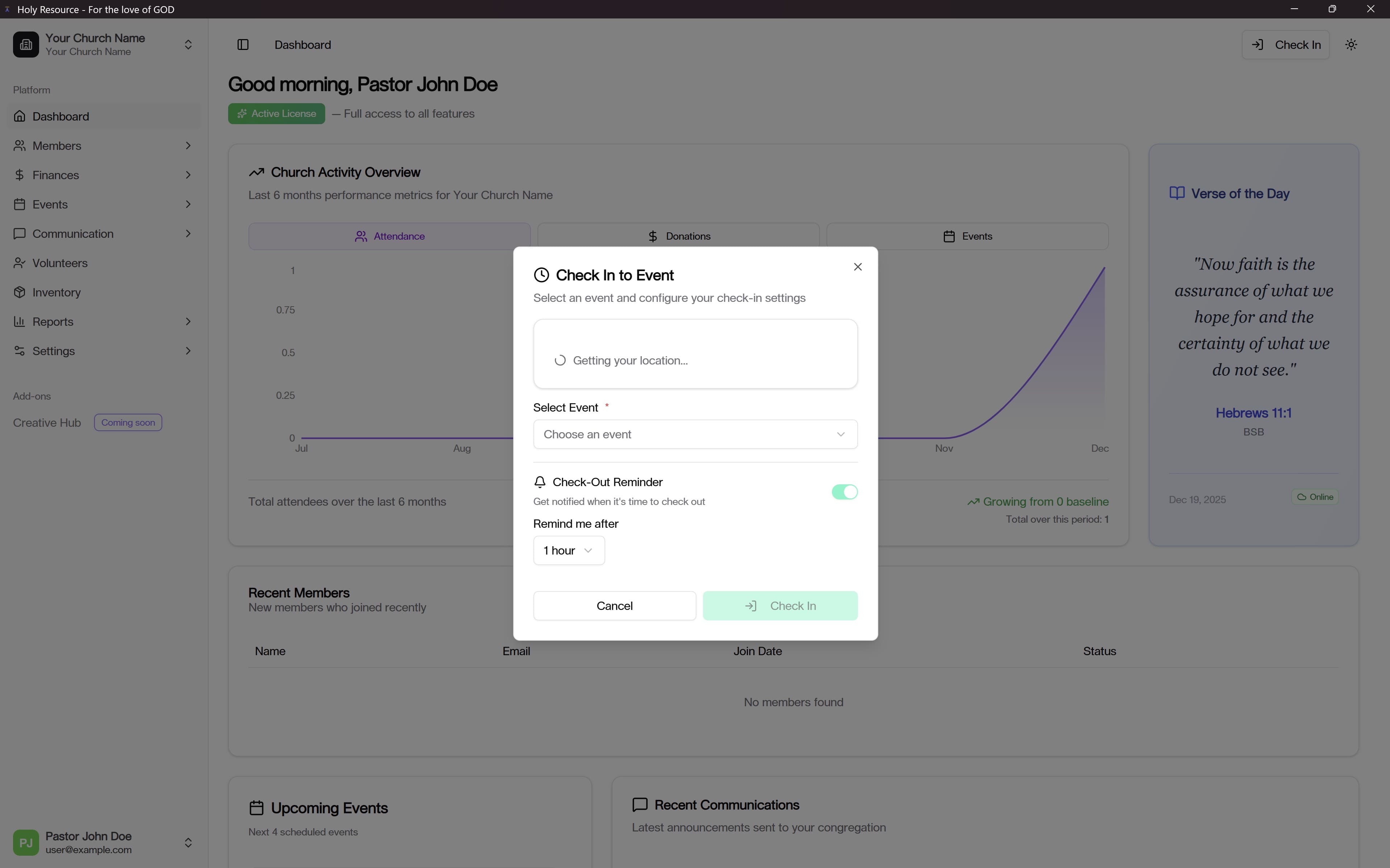
Better Event Check-In Location Support
Attendance check-ins became easier to verify and manage.
What Improved:
- Clearer location context during check-ins
- Better support for real-world event operations
- More confidence for attendance teams on active service days
Fixes and Stability
- Better release and deployment stability around the large feature rollout
- UI and workflow refinements after initial inventory launch
0.3.2 → 0.4.0: 0.3.2 was a bug-fix update. 0.4.0 introduced major operations upgrades for assets and attendance.
December 12, 2025
Fixes and Stability
- Improved updater reliability
- Reduced friction around installation and update flow
0.3.0 → 0.3.2: 0.3.0 introduced multiple major management features. 0.3.2 focused on making that experience steadier in production.
December 11, 2025
Smarter Volunteer Scheduling
Volunteer scheduling became more efficient and easier to manage.
What You Can Do Now:
- Build schedules faster
- Reduce conflicts and overload
- Improve coordination across volunteer teams
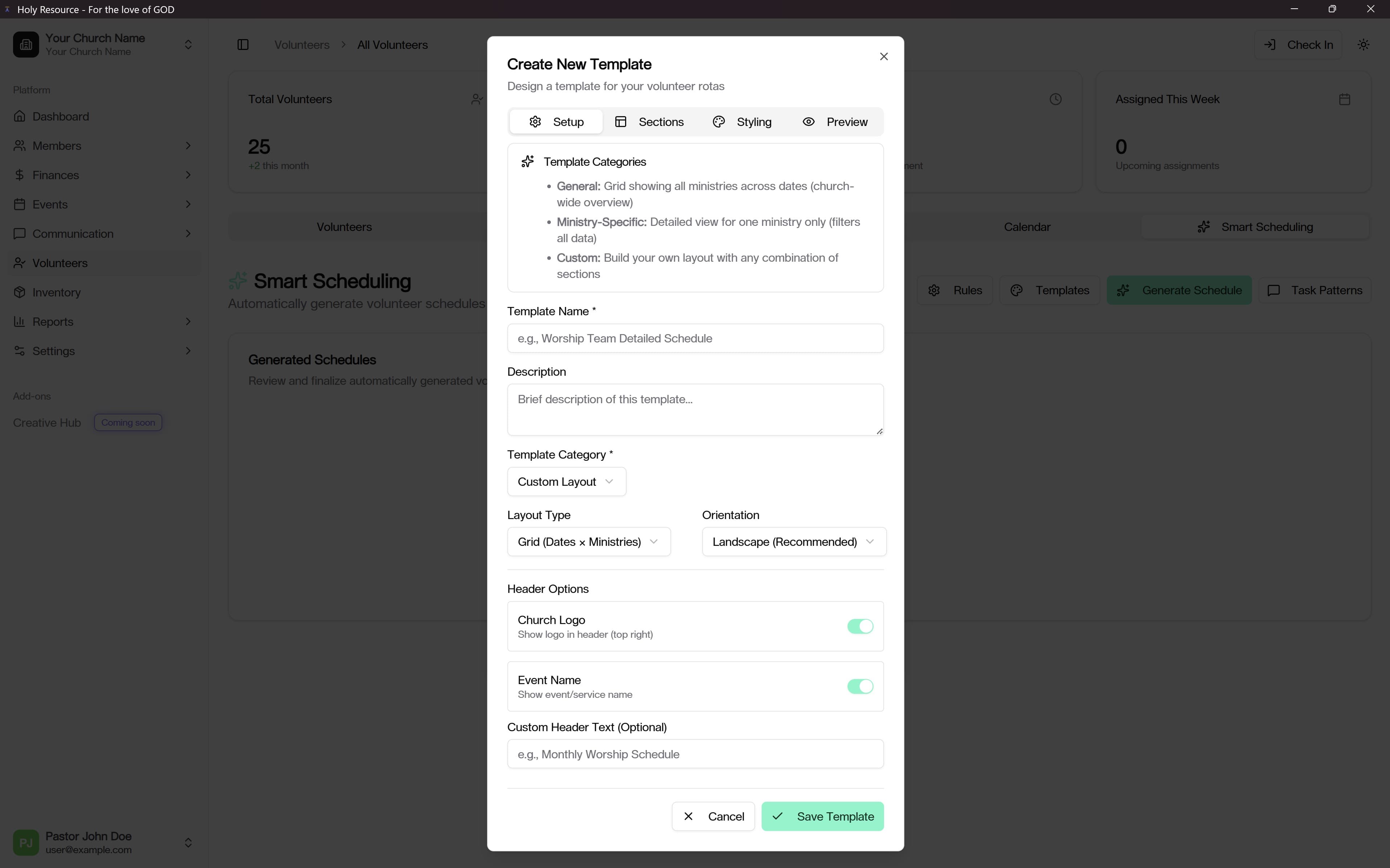
Better Templates and Reports
Church teams gained stronger planning and reporting visibility.
What Improved:
- More practical schedule template flexibility
- Better reporting for operations and trends
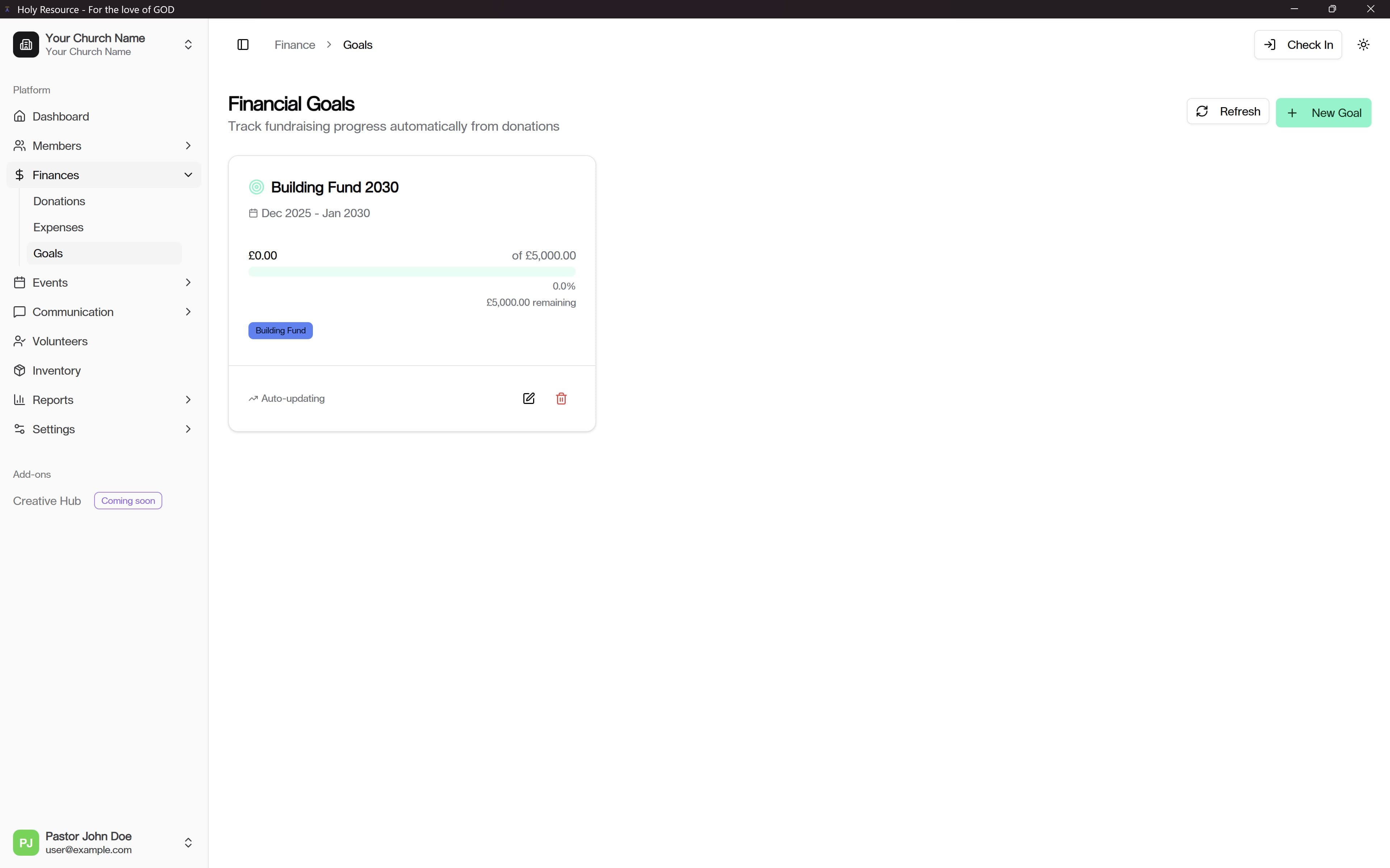
- Clearer financial and attendance insight for leadership
Multi-Branch and Account Improvements
Holy Resource became more scalable for growing ministries.
What You Can Do Now:
- Manage more than one branch with clearer separation
- Use stronger account controls and profile settings
- Improve day-to-day access and role handling
Fixes and Stability
- Better onboarding and login consistency
- UI quality and validation improvements across core flows
0.2.0 → 0.3.0: 0.2.0 established modern giving and payment workflows. 0.3.0 broadened Holy Resource into a fuller church operations platform.
October 21, 2025
Donation Management Upgrade
Holy Resource introduced a much richer giving workflow.
What You Can Do Now:
- Accept and track multiple giving methods
- Manage recurring giving more clearly
- Generate better donation records for church leadership and reporting
Better Financial Visibility
What Improved:
- Clearer donation trends and giving snapshots
- Better support for fiscal-year planning and review
- Stronger day-to-day finance workflow confidence
Fixes and Stability
- Broader workflow reliability as the platform expanded beyond the initial release
0.1.0 → 0.2.0: 0.1.0 launched the Holy Resource foundation. 0.2.0 introduced a major giving and finance operations upgrade.
October 6, 2025
Initial Release
Holy Resource launched with the core foundation for church management workflows. The first release established the base platform used by all later versions.